What's included
Overview
Custom Shops Pro
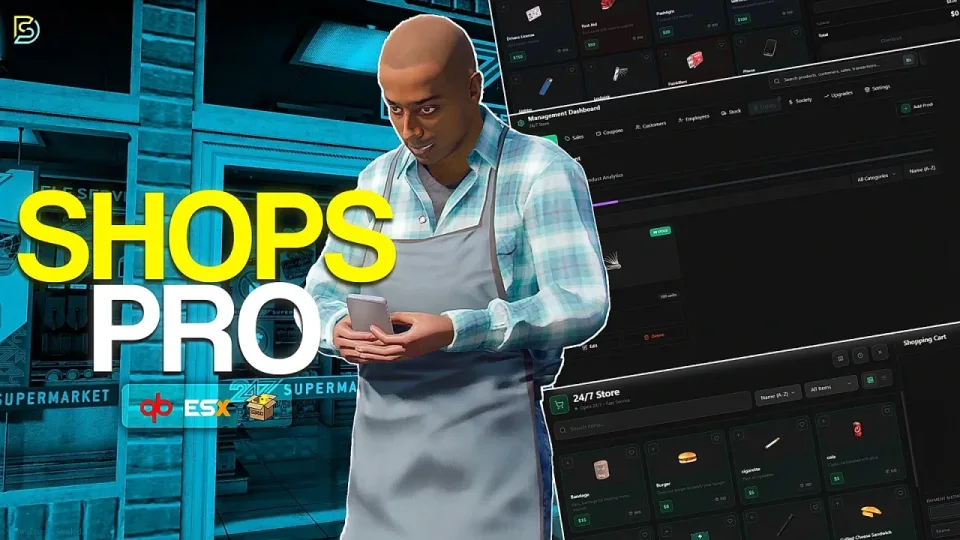
Over a hundred hours went into this script, and it shows. Custom Shops Pro is not a buy menu with a target zone on it. Every shop gets its own inventory, pricing, branding, staff, finances and analytics, all run through a management dashboard with 55+ granular permissions. It is closer to a business simulation than a shop script, and it is free.
Drop It In and Go
The included bridge auto-detects your framework (ESX, QBCore or QBox), your inventory and your targeting system. Item label, weight, image and description are pulled automatically from your inventory, and every value can be overridden per item.
Supported inventories (auto-detected): ox_inventory, qb-inventory, ps-inventory, lj-inventory, esx_inventory, codem-inventory, origen_inventory, jaksam_inventory, qs-inventory, qs-inventory-pro, tgiann-inventory
Supported society banking: qb-banking, esx_society, Renewed-Banking, okokBanking, fd_banking, tgg-banking
Performance
- 0.00ms idle
- 0.01ms in the main shop menu
- Briefly 0.02ms while loading management data
Intelligent caching keeps database queries down, and client-side operations reduce callback usage.
Any Shop You Can Think Of
Create unlimited shop types: convenience stores, gun shops, hardware stores, pharmacies, specialty stores, black markets. Each shop keeps its own inventory, pricing, branding and identity.
Beyond the standard storefront:
- Item-for-item exchanges: accept items as currency, like gold bars for goods, or mix cash and material trades in a single purchase
- Black markets: dirty money only, illegal economy support, optional player ownership
- Pawn shops: players sell straight from their inventory with a seller mode interface, accepted item filtering, value previews and total payout calculations
- Job-restricted shops: police armories, EMS supply rooms, mechanic stores, with multiple allowed jobs per shop
- Per-shop feature toggles: enable or disable transaction history, loyalty, cart presets and coupons individually for each store
The Shopping Experience
A modern responsive UI with grid and list views, real-time search, category filters, product images, descriptions, active sales, stock levels and category badges. Clicking a product opens a preview modal with large images, price breakdowns, stock availability and live quantity totals, and players can add to cart without leaving it.
- Cart: itemized breakdowns, quantity editing, automatic subtotals, discounts and a savings display
- Payments: cash, bank or society accounts, with configurable minimum grades for society purchases
- Coupons: percentage or fixed amount promo codes redeemed at checkout
- Loyalty program: points on every purchase with a configurable earn rate, redeemable for reward coupons and 5%, 10% or 15% discount vouchers
- Cart presets: save frequent baskets, then edit, delete, share or import them from other players
- Transaction history: full records of items, quantities, prices, discounts, payment methods and timestamps, with one-click reorder
- License restrictions: gate products behind licenses; unqualified buyers see a clear License Required state instead of a buy button
- Favorites: star products and filter down to just the starred list
- Serial registration: weapons can optionally receive serial numbers through metadata
Ownership and Management
Players can purchase shops, manage them, transfer ownership, sell to another player or sell back to the city. Purchase prices are configurable, permissions transfer automatically, and the whole ownership layer can be disabled if you only want NPC shops.
The management dashboard covers:
- Products: whitelist setup with custom pricing, custom categories, and job, gang or identifier restrictions
- Sales: time-limited percentage discounts with scheduled start and end times, scoped per product, per category or shop-wide, optionally restricted by player, job or gang. Active sales show original prices with strike-through pricing
- Coupon management: discount values, maximum caps, expiration dates, minimum purchases, category and product restrictions, usage limits, per-player limits, automatic resets, job and gang restrictions
- Customers: loyalty balances, total spending, purchase counts, last visits and individual histories, plus bans that show a clear access-denied message
- Employees: 55+ permissions across stock, pricing, coupons, analytics, customer and sales management, with role-based visibility, custom profile pictures, and features hidden automatically when access is missing
- Stock: order baskets, delivery timers with live countdowns, inventory transfers, capacity limits, and payment by cash, bank or business account
- Loyalty configuration: per-shop points-per-dollar rates, tier progression (Bronze, Silver, Gold, Platinum for example) with thresholds and permanent discounts, and unlimited custom rewards with name, description, icon, cost and discount value
- Finances: deposits and withdrawals, revenue, expenses, net profit, average sale value and transaction counts, visualized in line, area, bar and pie charts, filterable by keyword, type, date, customer, employee and amount
Shop Upgrades
Owners invest in their business through six upgrade paths, each with multiple configurable levels:
- Stock Capacity: raise inventory limits
- Reputation: unlock supplier discounts
- Express Logistics: shorten delivery times
- Product Slots: sell more products
- Employee Slots: hire more staff
- Loyalty Program: unlock customer rewards
Analytics
Reporting across the whole business: quantities sold, revenue and last-sold dates per product, coupon effectiveness and revenue impact per promotion, customer spending habits and loyalty progression, plus employee activity logs covering hiring, firing and permission changes. Stock history filters by employee, item, action and timeframe, and customer or employee names link straight to detailed profile pages.
Metadata Support
Configure any item with durability, quality, grade or custom metadata values, and sell multiple variants of the same item, like og_kush and skywalker_og. Works in both owned and non-owned shops.
Theme Customization
Ten built-in presets including deepVoid, slateStorm, midnightBlue and purpleHaze. Customize primary colors, scrollbars, semantic state colors, 40+ tag and badge colors, and the styling of transactions, employees, categories and upgrade cards, with grid, dots, cross or diagonal backgrounds. Everything lives in a single theme.lua.
Logging
25+ logged events with configurable destinations and individual toggles, formatted for Discord embeds, Fivemerr, FiveManage, Grafana and Loki.
Localization
Full locales system with German and English included. Add your own language in minutes.
Shop Settings
Per-shop configuration for name, map blip visibility, icon, color and scale, and opening hours. Shop names can be locked through the config if you want to keep them fixed.
There is much more to explore, with additional features planned for future updates.
Dependencies
- Framework: qb-core, qbx_core or es_extended
- Targeting: qb-target, q-target or ox_target
- Library: ox_lib
- Inventory: auto-detected, use whatever you already run from the list above
Specifications
Add this line to your server.cfg once the download is uploaded to resources/ (replace the folder name if yours differs):
ensure custom-shops-pro-shop-system
Frequently asked
How is Custom Shops Pro Business Simulation delivered?
Instantly by email after checkout - a download link lands in your inbox the moment payment clears. No manual approval, no waiting on a ticket.
Is it compatible with esx, qbcore, qbox?
Custom Shops Pro Business Simulation is built for esx, qbcore, qbox. Check the specifications below for the exact dependency list.
Do I get future updates?
Yes. Updates are included at no extra cost. New versions appear in the same download area you were originally emailed.
Can I customize the config?
Most behaviour is exposed as config options inside the resource - prices, permissions, locations and pacing can be tuned without touching the core files.